
Error message when starting AlphaPro after first time installation
From Zenitel Wiki

Problem
Error message "SuperPro initialization failed" or "RNBOsproInitialize Status = 12" when starting AlphaPro first time after installation.

Solution
This error message indicates that the driver for the hardware dongle (USB key) is not detected or installed. The error message will be displayed regardless if the dongle is inserted in the PC or not.
Windows 11
For Windows 11, download the Sentinel System Driver Installer 7.6.1.zip from the Zenitel Wiki download site
- Unzip the downloaded file
- Launch Sentinel System Driver Installer 7.6.1.exe
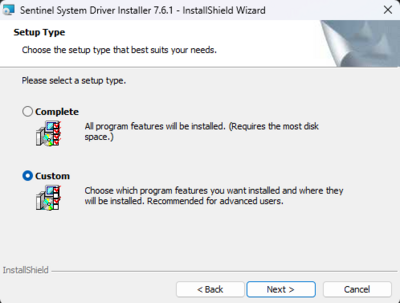
- When prompted to select the setup type, select Custom and click Next
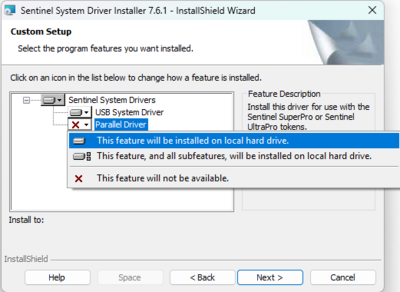
- From the list of drivers, enable the installation of Parallel Driver and click Next
- Start the installation


Windows 10 or earlier
After the AlphaPro installation has been installed by running the setup.exe file, the driver for hardware key must be installed separately.
- In the Start menu in Windows, open the folder Zenitel > AlphaPro
- Start "Launch Sentinel System Driver..."
- The driver will now be installed

