
Kits - Comparison chart: Difference between revisions
From Zenitel Wiki
No edit summary |
|||
| (4 intermediate revisions by 2 users not shown) | |||
| Line 1: | Line 1: | ||
{{AEIS}}Zenitel offers a number of IP based kits, which can be used for a wide range of applications | {{AEIS}}Zenitel offers a number of IP based kits, which can be used for a wide range of applications. | ||
This article compares the properties and capabilities of the different kits, and indicates which kit is best fit for a certain application. | This article compares the properties and capabilities of the different kits, and indicates which kit is best fit for a certain application. | ||
| Line 6: | Line 6: | ||
{| {{SimpleTable}} border="0" | {| {{SimpleTable}} border="0" | ||
|- | |- | ||
| style="text-align: center;" |[[File:ZMK-1angleRthumb.jpg|150px|link=ZMK-1]] | |||
| style="text-align: center;" |[[File:TKIS-2 2.png|130px|link=TKIS-2]] | | style="text-align: center;" |[[File:TKIS-2 2.png|130px|link=TKIS-2]] | ||
| style="text-align: center;" |[[File:TKIE.png|130px|link=TKIE-1]] | | style="text-align: center;" |[[File:TKIE.png|130px|link=TKIE-1]] | ||
| Line 13: | Line 14: | ||
| style="text-align: center;" |[[File:TKIV+.jpg|150px|link=TKIV+]] | | style="text-align: center;" |[[File:TKIV+.jpg|150px|link=TKIV+]] | ||
|- | |- | ||
| style="text-align: center;font-size:110%" |[[ZMK-1]] | |||
| style="text-align: center;font-size:110%" |[[TKIS-2]] | | style="text-align: center;font-size:110%" |[[TKIS-2]] | ||
| style="text-align: center;font-size:110%" |[[TKIE-1]] | | style="text-align: center;font-size:110%" |[[TKIE-1]] | ||
| Line 33: | Line 35: | ||
! colspan="3" style="text-align: center; background-color: #ffd400;" |'''I/Os''' | ! colspan="3" style="text-align: center; background-color: #ffd400;" |'''I/Os''' | ||
! colspan="2" style="text-align: center; background-color: #ffd400;" |'''Accessories''' | ! colspan="2" style="text-align: center; background-color: #ffd400;" |'''Accessories''' | ||
! colspan=" | ! colspan="6" style="text-align: center; background-color: #ffd400;" |'''Support for:''' | ||
|- | |- | ||
! style="background-color: #ffd400;" |'''Name''' | ! style="background-color: #ffd400;" |'''Name''' | ||
| Line 51: | Line 53: | ||
! style="background-color: #ffd400;" |'''Keyboard''' | ! style="background-color: #ffd400;" |'''Keyboard''' | ||
! style="background-color: #ffd400;" |'''LCD Display''' | ! style="background-color: #ffd400;" |'''LCD Display''' | ||
! style="background-color: #ffd400;" |'''HDMI (touch)Display''' | |||
! style="background-color: #ffd400;" |'''DAK48 module''' | ! style="background-color: #ffd400;" |'''DAK48 module''' | ||
! style="background-color: #ffd400;" |'''Camera''' | ! style="background-color: #ffd400;" |'''Camera''' | ||
! style="background-color: #ffd400;" |'''USB-C HID''' | |||
|- | |- | ||
! style="background-color: #d0cece;" |'''TKIS-2''' | ! style="background-color: #d0cece;" |'''TKIS-2''' | ||
| Line 66: | Line 70: | ||
|6 | |6 | ||
|Yes *** | |Yes *** | ||
|No | |||
|No | |||
|No | |No | ||
|No | |No | ||
| Line 87: | Line 93: | ||
|Yes | |Yes | ||
|Yes | |Yes | ||
|No | |||
|No | |||
|No | |No | ||
|No | |No | ||
| Line 106: | Line 114: | ||
|Yes | |Yes | ||
|Yes | |Yes | ||
|No | |||
|No | |||
|No | |No | ||
|No | |No | ||
| Line 111: | Line 121: | ||
|No | |No | ||
|- | |- | ||
! style="background-color: #d0cece;" |'''TKIE- | ! style="background-color: #d0cece;" |'''TKIE-3CC''' | ||
! style="background-color: #d0cece;" |'''1008132030''' | ! style="background-color: #d0cece;" |'''1008132030''' | ||
|No | |No | ||
| Line 126: | Line 136: | ||
|Yes | |Yes | ||
|[[Keyboard matrix - TKIE-3|Yes]] | |[[Keyboard matrix - TKIE-3|Yes]] | ||
|No | |||
|No | |||
|No | |No | ||
|No | |No | ||
| Line 142: | Line 154: | ||
|8 + 6 | |8 + 6 | ||
|Yes *** | |Yes *** | ||
|No | |||
|No | |||
|No | |No | ||
|No | |No | ||
| Line 161: | Line 175: | ||
|6 | |6 | ||
|Yes *** | |Yes *** | ||
|No | |||
|No | |No | ||
|No | |No | ||
| Line 167: | Line 182: | ||
|No | |No | ||
|Yes | |Yes | ||
|No | |||
|- | |- | ||
! style="background-color: #d0cece;" |'''IPMSK-V2''' | ! style="background-color: #d0cece;" |'''IPMSK-V2''' | ||
| Line 184: | Line 200: | ||
|Yes | |Yes | ||
|[https://www.zenitel.com/product/display-ip-master-station-board Yes] | |[https://www.zenitel.com/product/display-ip-master-station-board Yes] | ||
|No | |||
|Yes | |||
|No | |||
|No | |||
|- | |||
! style="background-color: #d0cece;" |'''ZMK-1''' | |||
! style="background-color: #d0cece;" |'''1008493000''' | |||
|Metal | |||
|2 | |||
|15W | |||
|Yes | |||
|No | |||
|Electret mic | |||
|Yes | |||
|1 | |||
|2 inputs | |||
|Yes | |Yes | ||
|Yes (USB-C) | |||
|Yes (USB-C) | |||
|Yes (USB-C) | |||
|No | |No | ||
|Yes | |||
|No | |||
|Yes (USB-C) | |||
|Yes | |||
|} | |} | ||
</div> | </div> | ||
| Line 212: | Line 251: | ||
|style="text-align: center; background-color: #ffd400;" |'''TKIE-1''' | |style="text-align: center; background-color: #ffd400;" |'''TKIE-1''' | ||
|style="text-align: center; background-color: #ffd400;" |'''TKIE-2''' | |style="text-align: center; background-color: #ffd400;" |'''TKIE-2''' | ||
|style="text-align: center; background-color: #ffd400;" |'''TKIE- | |style="text-align: center; background-color: #ffd400;" |'''TKIE-3CC''' | ||
|style="text-align: center; background-color: #ffd400;" |'''IP-LCM''' | |style="text-align: center; background-color: #ffd400;" |'''IP-LCM''' | ||
|style="text-align: center; background-color: #ffd400;" |'''TKIV+''' | |style="text-align: center; background-color: #ffd400;" |'''TKIV+''' | ||
|style="text-align: center; background-color: #ffd400;" |'''IPMSK-V2''' | |style="text-align: center; background-color: #ffd400;" |'''IPMSK-V2''' | ||
|style="text-align: center; background-color: #ffd400;" |'''ZMK-1''' | |||
|- | |- | ||
|Substation | |Substation | ||
|Up to 6 call buttons *** | |Up to 6 call buttons *** | ||
|style="text-align: center; | [[file:Checkbox.png|30px]] | |style="text-align: center; | [[file:Checkbox.png|30px]] | ||
| | |||
| | | | ||
| | | | ||
| Line 235: | Line 276: | ||
| | | | ||
|style="text-align: center; | [[file:Checkbox.png|30px]] | |style="text-align: center; | [[file:Checkbox.png|30px]] | ||
| | |||
| | | | ||
|- | |- | ||
| Line 242: | Line 284: | ||
|style="text-align: center; | [[file:Checkbox.png|30px]] | |style="text-align: center; | [[file:Checkbox.png|30px]] | ||
|style="text-align: center; | [[file:Checkbox.png|30px]] | |style="text-align: center; | [[file:Checkbox.png|30px]] | ||
| | |||
| | | | ||
| | | | ||
| Line 256: | Line 299: | ||
| | | | ||
| | | | ||
| | |||
|- | |||
|Substation | |||
|(Touch)Display, camera | |||
| | |||
| | |||
| | |||
| | |||
| | |||
| | |||
| | |||
|style="text-align: center; | [[file:Checkbox.png|30px]] | |||
|- | |- | ||
|Masterstation | |Masterstation | ||
| Line 266: | Line 321: | ||
| | | | ||
|style="text-align: center; | [[file:Checkbox.png|30px]] | |style="text-align: center; | [[file:Checkbox.png|30px]] | ||
| | |||
|- | |- | ||
|Masterstation | |Masterstation | ||
| Line 276: | Line 332: | ||
| | | | ||
|style="text-align: center; | [[file:Checkbox.png|30px]] | |style="text-align: center; | [[file:Checkbox.png|30px]] | ||
| | |||
|- | |- | ||
|Masterstation | |Masterstation | ||
| Line 286: | Line 343: | ||
| | | | ||
|style="text-align: center; | [[file:Checkbox.png|30px]] | |style="text-align: center; | [[file:Checkbox.png|30px]] | ||
| | |||
|- | |- | ||
|Audio Interface | |Audio Interface | ||
|PA (Public Address) amplifer | |PA (Public Address) amplifer | ||
|style="text-align: center; | [[file:Checkbox.png|30px]] | |style="text-align: center; | [[file:Checkbox.png|30px]] | ||
| | |||
| | | | ||
| | | | ||
| Line 302: | Line 361: | ||
|style="text-align: center; | [[file:Checkbox.png|30px]] | |style="text-align: center; | [[file:Checkbox.png|30px]] | ||
|style="text-align: center; | [[file:Checkbox.png|30px]] | |style="text-align: center; | [[file:Checkbox.png|30px]] | ||
| | |||
| | | | ||
| | | | ||
| Line 312: | Line 372: | ||
|style="text-align: center; | [[file:Checkbox.png|30px]] | |style="text-align: center; | [[file:Checkbox.png|30px]] | ||
|style="text-align: center; | [[file:Checkbox.png|30px]] | |style="text-align: center; | [[file:Checkbox.png|30px]] | ||
| | |||
| | | | ||
| | | | ||
| Line 320: | Line 381: | ||
|Customized IP Speaker | |Customized IP Speaker | ||
|style="text-align: center; | [[file:Checkbox.png|30px]] | |style="text-align: center; | [[file:Checkbox.png|30px]] | ||
| | |||
| | | | ||
| | | | ||
| Line 332: | Line 394: | ||
| | | | ||
|style="text-align: center; | [[file:Checkbox.png|30px]] | |style="text-align: center; | [[file:Checkbox.png|30px]] | ||
| | |||
| | | | ||
| | | | ||
| Line 338: | Line 401: | ||
|- | |- | ||
|I/O device | |I/O device | ||
|Input device for | |Input device for receiving alarms (dry contacts), 6 inputs | ||
|style="text-align: center; | [[file:Checkbox.png|30px]] | |style="text-align: center; | [[file:Checkbox.png|30px]] | ||
| | |||
| | | | ||
| | | | ||
| Line 348: | Line 412: | ||
|- | |- | ||
|I/O device | |I/O device | ||
|Input device for | |Input device for receiving alarms, 14 inputs | ||
| | | | ||
| | | | ||
| Line 354: | Line 418: | ||
| | | | ||
|style="text-align: center; | [[file:Checkbox.png|30px]] | |style="text-align: center; | [[file:Checkbox.png|30px]] | ||
| | |||
| | | | ||
| | | | ||
| Line 360: | Line 425: | ||
|Output device for operating relays, 1 relay | |Output device for operating relays, 1 relay | ||
|style="text-align: center; | [[file:Checkbox.png|30px]] | |style="text-align: center; | [[file:Checkbox.png|30px]] | ||
| | |||
| | | | ||
| | | | ||
| Line 372: | Line 438: | ||
|style="text-align: center; | [[file:Checkbox.png|30px]] | |style="text-align: center; | [[file:Checkbox.png|30px]] | ||
|style="text-align: center; | [[file:Checkbox.png|30px]] | |style="text-align: center; | [[file:Checkbox.png|30px]] | ||
| | |||
| | | | ||
| | | | ||
| Line 384: | Line 451: | ||
| | | | ||
|style="text-align: center; | [[file:Checkbox.png|30px]] | |style="text-align: center; | [[file:Checkbox.png|30px]] | ||
| | |||
| | | | ||
| | | | ||
| Line 394: | Line 462: | ||
| | | | ||
|style="text-align: center; | [[file:Checkbox.png|30px]] | |style="text-align: center; | [[file:Checkbox.png|30px]] | ||
| | |||
| | | | ||
| | | | ||
Latest revision as of 14:28, 27 November 2025

Zenitel offers a number of IP based kits, which can be used for a wide range of applications.
This article compares the properties and capabilities of the different kits, and indicates which kit is best fit for a certain application.
Kit offerings
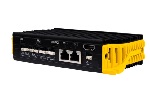
|
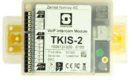
|
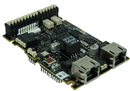
|
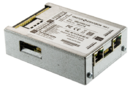
|
|

|
|
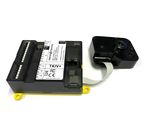
| ZMK-1 | TKIS-2 | TKIE-1 | TKIE-2 | TKIE-3CC | IP-LCM | TKIV+ |
Properties and capabilities
| Kit | General | Audio out | Audio In | I/Os | Accessories | Support for: | |||||||||||||
|---|---|---|---|---|---|---|---|---|---|---|---|---|---|---|---|---|---|---|---|
| Name | Item no. | Housing | Ethernet ports | Loudspeaker output | Line Out (0 dBm) | Additional speaker | Microphone | Line In | Relays | Digital I/Os | Inputs as key matrix | Handset | Headset | Keyboard | LCD Display | HDMI (touch)Display | DAK48 module | Camera | USB-C HID |
| TKIS-2 | 1008131020 | Plastic | 1 | 10W | Yes | No | Electret mic | No | 1 | 6 | Yes *** | No | No | No | No | No | No | No | No |
| TKIE-1 | 1008132010 | No | 2 | 10W | Yes | No | Electret mic | Yes | 2 * | 6 | Yes *** | Yes | Yes | No | No | No | No | No | No |
| TKIE-2 | 1008132020 | Metal | 2 | 10W | Yes | No | Electret mic | Yes | 2 * | 6 | Yes *** | Yes | Yes | No | No | No | No | No | No |
| TKIE-3CC | 1008132030 | No | 2 | 10W | Yes | No | Electret mic | Yes | 2 * | 6 | Yes *** | Yes | Yes | Yes | No | No | No | No | No |
| IP-LCM | 1008095201 | Plastic | 1 | 10W | Yes | No | Electret mic | No | 8 + 1 | 8 + 6 | Yes *** | No | No | No | No | No | No | No | No |
| TKIV+ | 1008331010 | Plastic | 1 | 10W | Yes | No | Electret mic | No | 1 | 6 | Yes *** | No | No | No | No | No | No | Yes | No |
| IPMSK-V2 | 1008493000 | No | 2 | 1.5W | No | 5 W | Electret mic | No | 1 | 3 inputs | No | Yes | Yes | Yes | Yes | No | Yes | No | No |
| ZMK-1 | 1008493000 | Metal | 2 | 15W | Yes | No | Electret mic | Yes | 1 | 2 inputs | Yes | Yes (USB-C) | Yes (USB-C) | Yes (USB-C) | No | Yes | No | Yes (USB-C) | Yes |
- * Two more relays (4 in total) by using the TA-10 module in combination with the TKIE kit.
- ** LCD Display for Master kit: 1008099000
- *** Four inputs can be combined in a matrix function, providing 15 different input signals. This is supported in SIP mode and Edge mode only.
Relay switching capacity:
- TKIS and TKIE: 60 watt (max. 250VAC)
- IP-LCM and TA-10: 8A (max. 250VAC)
Application areas
The table below shows which kit is best fit for a certain application. Please note that often several types of kits might be suitable for the same application.
| Category | Application | TKIS-2 | TKIE-1 | TKIE-2 | TKIE-3CC | IP-LCM | TKIV+ | IPMSK-V2 | ZMK-1 |
| Substation | Up to 6 call buttons *** | 
|
|||||||
| Substation | Up to 6 call buttons, camera |
|
|||||||
| Substation | Up to 6 call buttons, handset |
|
|
||||||
| Substation | Up to 6 call buttons, headset |
|
|
||||||
| Substation | (Touch)Display, camera |
| |||||||
| Masterstation | with full keypad |
|
|
||||||
| Masterstation | with full keypad and LCD display |
|
|||||||
| Masterstation | with full keypad, LCD display and support for DAK-48 module |
|
|||||||
| Audio Interface | PA (Public Address) amplifer |
|
|||||||
| Audio Interface | Mobile Radio system (ICX-AlphaCom) |
|
|
||||||
| Audio Interface | Program Source (ICX-AlphaCom) |
|
|
||||||
| Audio Interface | Customized IP Speaker |
|
|||||||
| Audio Interface | Customized IP Speaker, answer in speaker |
|
|||||||
| I/O device | Input device for receiving alarms (dry contacts), 6 inputs |
|
|||||||
| I/O device | Input device for receiving alarms, 14 inputs |
|
|||||||
| I/O device | Output device for operating relays, 1 relay |
|
|||||||
| I/O device | Output device for operating relays, 2 relays |
|
|
||||||
| I/O device | Output device for operating relays, 4 relays * |
|
|
|
|||||
| I/O device | Output device for operating relays, 9 relays |
|
- * When using the TKIE kit, 4 relays are achieved by combining the TKIE kit with the TA-10 module.
- *** Four inputs can be combined in a matrix function, providing 15 inputs/call buttons. This is supported in SIP mode and Edge mode only.